Project
Onboarding a machine using a video walkthrough
Turning an expert's machine walkthrough into illustrated procedures and troubleshooting references, with structured facts grounded in the source video.
Context before this came up
We were trying to build Mary, a troubleshooting chat assistant that can help users answer questions and access machine information. Some of that information is documented in operational manuals and specification sheets; some of it is undocumented, informal know-how from debugging conversations, or just sits in the heads of experts and maintenance people. This is the kind of knowledge needed to just get something running.
You have a complex machine, and an expert willing to spend some time explaining it, but not enough time to educate everyone who works on it. That leads to requests for information from the shop floor at inconvenient times, often while the expert is already busy with something else.
The problem
Why we tried interviewing operators on video
One specific ask was: if an expert records a procedure, how can you guide a rookie operator, someone with maybe one month at the company, toward the same level of practical knowledge as someone with two years of experience?
To make it simple, a guided procedure could show a photo of the component, show how an action is performed with it, and then proceed to the next step. That led to a simple conclusion: record an expert demonstrating the machine, then convert the video into a compressed sequence of images, text, and metadata that a chat application can use without combing through the video again.
I thought of it internally as a highlights reel of a game. You watch a one-hour game and get a two-minute highlight video. Here, the highlights also need context: this is the moment someone hit a six; this is the moment a team took a wicket. Recognition of the moment was important too.
Why I started with my coffee machine
Before telling people, “give us this kind of video and this is a template or script you can follow,” I wanted to know whether a walkthrough could actually be converted into something useful for an agent or chat application. It was a chicken-and-egg problem.
So I did a small controlled experiment first. I shot a video with my coffee machine at home. It was a simple drip coffee machine, but it had all the things I could test:
- components;
- ways of operating the machine;
- safety checks;
- things not to do;
- visual elements that are not just describable in narration.
The questions I had were:
- I can describe the machine and point to its components. Can an onboarding pipeline extract those components and identify them?
- If I demonstrate a multi-step procedure, can it extract discrete steps accurately and attach reference images or clips?
- What if I am not saying anything, but I am pointing, pressing something, or showing a change in machine state? Can that be captured?
I was fairly sure some version of this could work, but I did not have concrete evidence. That was the point of the experiment.
After a bit of stage setting, cleaning the background, and a couple of retakes, I got to a 13-minute video.
Extracting knowledge: building facts.json
Using the video transcript
I started with the narration of the video in an SRT file, transcribed with OpenAI’s whisper-1. Pretty standard starting point for content and timestamps. The coffee-machine SRT is about 4.7k tokens.1
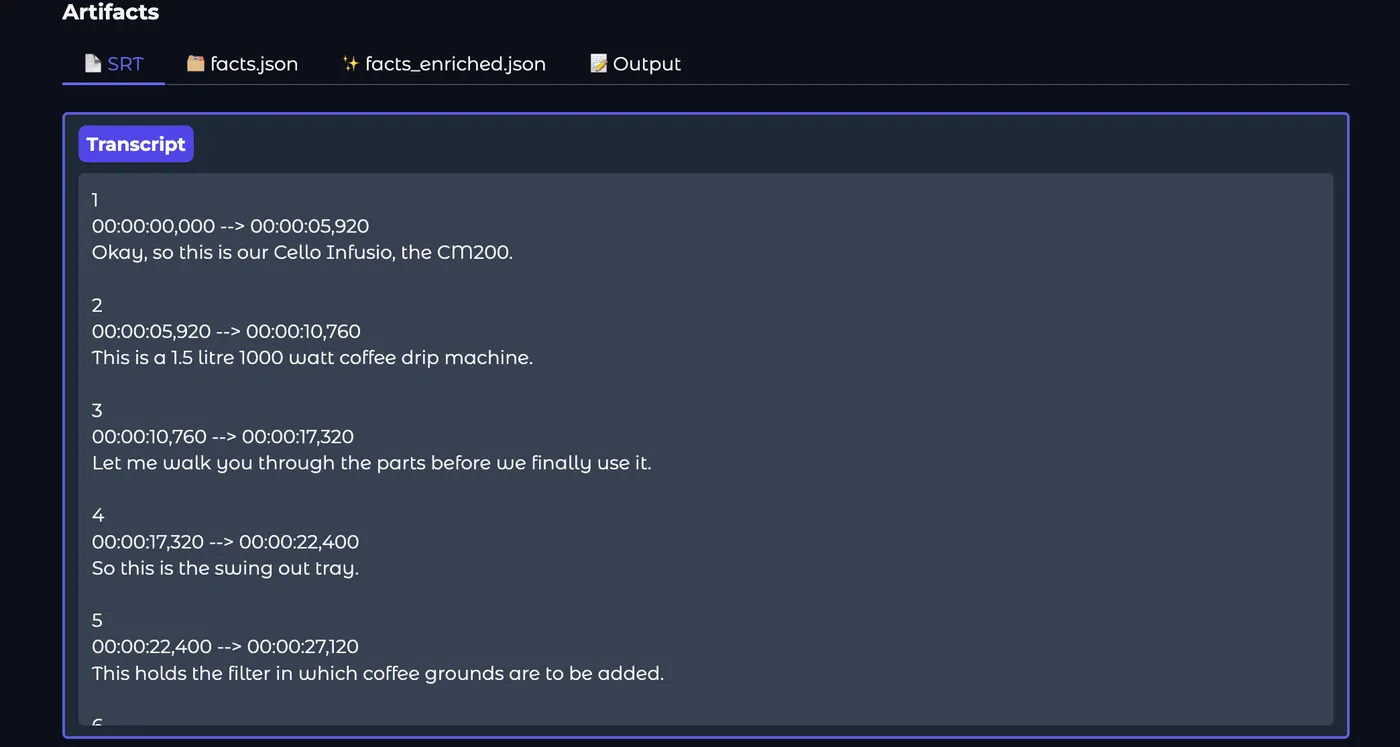 The SRT: numbered narration segments with start and end timestamps.
On using a single prompt
Why not try the simplest approach first?
In previous experiments with extracting structured facts out of audio transcripts, I had seen performance degrade when the corpus was over 100k tokens, often losing information in the middle of the corpus. A brief prompt structure used previously with CNC material was:
Role:
  knowledge extraction agent

Input:
  Haas VF2 troubleshooting transcript

Task:
  Extract all useful operator knowledge
  Preserve exact measurements, codes, tool names, warnings
  Do not summarise or compress
  Keep facts atomic

Output:
  A single Markdown-style knowledge summary,
  organised into broad sections:
    1. Machine Understanding
    2. Normal Operation
    3. Troubleshooting
    4. Alarm Codes
Since this wasn’t performing well, I suspected the corpus of 113k tokens was too large for a single LLM call. I had a list of 12 handpicked facts which were not captured by the pipeline, and only 2 of them showed up in the Normal Operation section. On chunking and managing context, this increased to 10 out of 12, which led me to believe that smaller passes are more reliable (which makes intuitive sense).2
Specialist extraction and the shape of facts
Even though the coffee-video transcript was much smaller than the earlier corpus, I tried to build this in a generic sense: videos could be arbitrarily long, and the work being done by each LLM call could be separated. The first typed version had four extractors: component, fault, procedure, and observation.
The earlier Markdown pipeline did chunk transcripts with a small overlap, then ran specialist section extractors and merge passes. The typed version later deliberately sent the whole normal-length SRT to each specialist; chunking became a future threshold for unusually long transcripts rather than the coffee-video default.
component
  - nylon filter
  - water tank
  - carafe

procedure
  - brewing coffee
      - add water
      - add coffee grounds
      - seat filter
      - position carafe
      - turn machine on

fault
  - coffee does not drip
      symptom: coffee isn't dispensing
      cause: carafe isn't depressing the anti-drip valve
      fix: seat the carafe correctly

observation
  - although the tank is marked up to 10 cups,
    I normally keep it below ~6 because this unit can drip
Each type of fact has a different structure. For provenance, every fact had a timestamp; components, faults, and observations could also carry all their mentions.
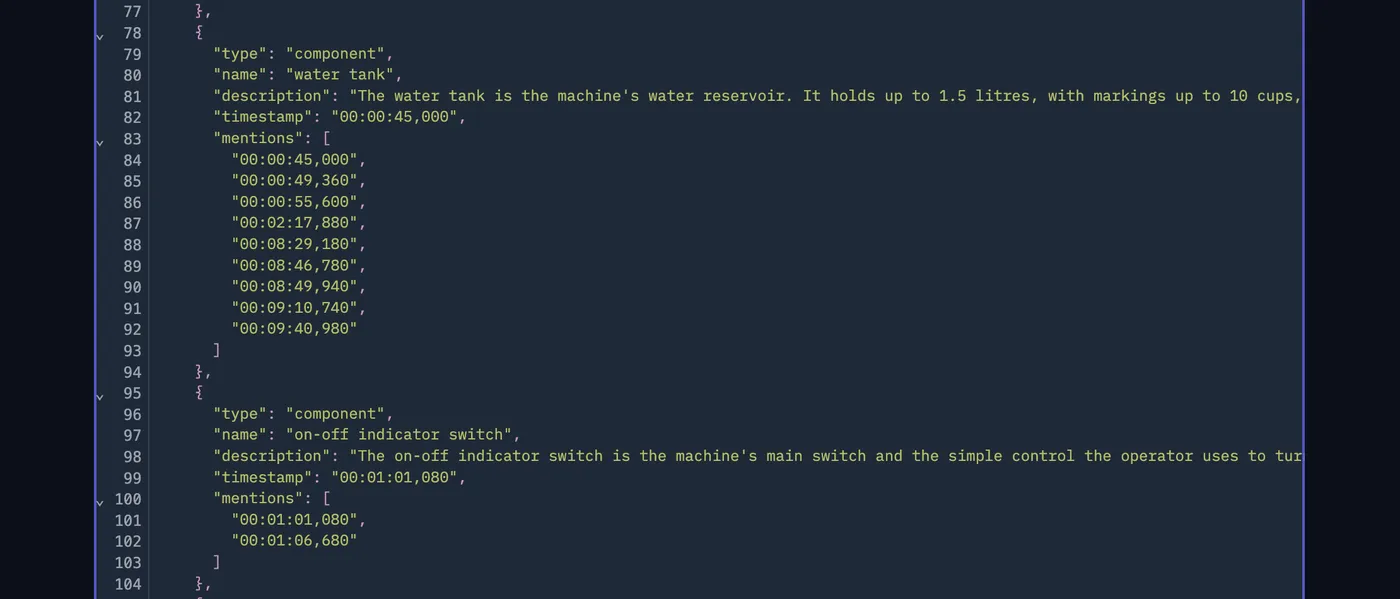 A real component from
facts.json: the water tank, its first timestamp, and every later mention.
I realised I had forgotten general machine facts/specifications, so I also added a machine fact.
Merge/dedup
Multiple extractor outputs needed a smart merge/dedup. I used another LLM merge pass separately for each fact type. For components and faults it could group things referring to the same entity, combine descriptions, and collect all timestamps where the fact was mentioned. For procedures it also had to combine individual steps and put them back into sequence.
After that came a deterministic validation chain: types, timestamp format and bounds, duplicates, required fields, and step ordering.
I faced some hallucinations where timestamps were cited outside the video interval :/ The timestamp-bounds validator rejected those entries.
What was still wrong?
After running the pipeline a few times, it was clear there were fuzzy decisions about facts.
One example was the difference between an observation and a fault. “Make sure the carafe is positioned correctly” sounds like an observation or tip, but in the video I was demonstrating a real failure mode: if it is not positioned correctly, it does not depress the anti-drip valve and the coffee does not flow. That was much more useful represented as symptom → cause → fix.
Procedure steps could similarly leak into observations. Consumables/accessories could get classified as components. Later, on another machine evaluation, there was almost the opposite issue in places: useful setup tools/gauges could be missed while relatively unimportant panel keys were extracted.
Video grounding
What narration could not capture (kind of obv)
At this point I had transcript → custom facts.json. It could capture things that were said with timestamps fairly accurately, at least by eyeballing it against the script. It was a spine for the video.
There are moments where I say “this is not okay” or “this locks into the notch here” with no additional voice information. That is precisely why video is being used. Much of the useful visible information remains, you guessed correctly, in the frames. Which led me to video understanding.
Twelve Labs
As it turns out, I was getting impatient and wanted to get something up as soon as possible without pottering about with local VLMs. I came across Twelve Labs and its API platform.
At the time, the two parts that interested me were Marengo and Pegasus. Marengo was the video-search model: index a video, search with natural-language queries such as “the operator removes the filter,” and get back relevant moments. Pegasus was the generative video-understanding model: give it a video and a prompt and ask it to describe or reason about what was happening.3
After going through their offerings, I had this structure in mind:
fact → Marengo Search → find the relevant moment → Pegasus Analyze → attach clip + fact + description of the clipFor example, if facts.json contained a component called filter, Marengo could search the walkthrough for the moment where the filter was being shown. Pegasus could then describe what the filter looked like, where it was situated, and what I was doing with it. The same idea could be applied to an individual procedure step or a fault.
What worked, what didn’t
The first results were not bad. When a procedure was being narrated while I performed it, Pegasus generally described what was happening pretty well. Procedures and faults looked much stronger than components.
Components were trickier. Several were introduced close together in the walkthrough, and the timestamp windows around them overlapped. Pegasus could end up describing whatever was most prominent in that window. At one point the filter basket was effectively being described for multiple components: filter, water tank, indicator light, and glass carafe.
My next idea was to use Marengo Search to find a better moment for each fact. One practical problem was that the Search API did not expose the confidence value I expected to use as a rejection threshold. The implementation effectively became:
# SDK v1.2.4 returns rank, not a confidence/score.
if primary_results:
    clip = primary_results[0]
    return clip, "accepted"
So getting a result did not give me a particularly good way of deciding whether it was actually the right result.
Pegasus Analyze had another limitation. The API I was using could not restrict analysis to the returned time range. The timestamps instead became part of the prompt:
full_prompt = (
    f"Focus on the video segment approximately between "
    f"{start_s:.1f}s and {end_s:.1f}s.\n\n{prompt}"
)
response = self._client.analyze(
    video_id=asset_id,
    prompt=full_prompt,
)
The request was still analysing and billing against the complete video. My notes record 27 Analyze calls on the roughly 13-minute video costing around $7. For a pipeline where every component, fault, and individual procedure step might need visual grounding, this was not something I wanted to keep scaling.
Video grounding, ep 2
At this point, I realised I already had a reasonable signal for where to look in the video. Every fact in facts.json had a timestamp, repeated mentions could have multiple timestamps, and every procedure step had its own timestamp. The Twelve Labs experiment made me reconsider whether I needed semantic video search at all.
Instead of searching the entire video again for the relevant moment, I could use these timestamps as anchors and ask a video model to inspect what was happening around them. I tried this with Gemini 2.5 Flash.4
A component could look roughly like:
{
  "type": "component",
  "name": "filter",
  "timestamp": "00:00:22,400",
  "mentions": [
    "00:02:50,720",
    "00:03:24,360",
    "00:07:16,000"
  ]
}
Instead of asking Gemini to locate the filter somewhere in a 13-minute video, I could give it the places where narration referred to the filter and ask it to inspect those moments. The video was uploaded once per run rather than separately for every fact, and I also experimented with context caching so the same video context could be reused across many fact-level requests.
 Component enrichment log, with prompt and cached token counts per call.
Why different prompts for different facts
This sounds slightly obvious in retrospect, but a component and a procedure step require different kinds of visual understanding. For a component, I mostly care about appearance and spatial location. For a procedure, I care about motion and interaction. For a fault, I care about evidence for the troubleshooting structure I already have.
component:  what does it look like? where is it? what is next to it?
            how is it mounted/positioned?

procedure:  what is the operator doing? which hand(s)? what is touched?
            what moves? what changes before/after the action?

fault:      can I actually see the symptom? can I see the physical cause?
            is the fix demonstrated? can I distinguish bad state from good state?
The important implementation detail was that I was not asking Gemini for another prose summary. I wanted structured fields attached to the fact that already existed.
{
  "type": "fault",
  "name": "carafe incorrectly positioned",
  "symptom": "...",
  "cause": "...",
  "fix": "...",
  "timestamp": "...",

  "visual": {
    "symptom_visible": true,
    "cause_visible": true,
    "fix_demonstrated": true,
    "description": "...",
    "best_mention": "..."
  }
}
This became facts_enriched.json. It also meant the typed representation was doing more than making JSON neat: the visual step could use the fact type to decide what visual information to extract.
The output needed to be useful in a document, not just exist as text. So part of the visual extraction was choosing a representative timestamp and extracting a frame from the source video with ffmpeg. The later implementation extracts start/mid/end frames for procedure steps and a single frame for components/faults.
One remaining hole
Everything starts with something extracted from narration. If I silently point to something important, press a button without saying anything, or demonstrate a visual state without talking about it, there may be no fact and therefore no timestamp to trigger visual grounding.
I experimented with a gap-discovery pass that looked at portions of the video not already covered by extracted fact windows. This was an attempt to recover purely visual moments rather than pretending the transcript-first architecture could discover them automatically.
Manual annotation benchmark
Up to this point, a lot of evaluation was basically me looking at generated output, going back to the video, and checking whether it looked correct. I wanted to benchmark this a little more systematically.
I built a local annotation interface. It loads a video and facts.json in the browser, creates one ticket per component, procedure step, fault, and observation, and exports a ground_truth.json file. The benchmark had 64 tickets: 13 components, 36 procedure steps, 8 faults, and 7 observations.
This took me around two hours to annotate.
The interesting part was that I was not comparing two generated summaries. I could compare individual pieces of visual information. For a component: did we agree on whether it was visible, what it looked like, and where it was? For a fault: was the symptom actually visible? Was the cause visible? Did I demonstrate the fix? For a procedure step: what action was actually being performed and which frame represented it best?
Results
There were small disagreements between my annotations and Gemini’s output. One example was something as basic as which hand I was using for a procedure step. This was a quirk where, no matter what, Gemini could not find out correctly which hand was being used, even though the video was taken with POV.
But the outputs were useful enough for me to replace the Twelve Labs implementation with the Gemini version.
Ending it
Turning it into something human-readable
By this point I had two useful intermediate representations, facts.json and facts_enriched.json, but neither was something I would hand to an operator or put directly on a screen.
The final stage rendered the facts into Markdown and optionally self-contained HTML, organised roughly as machine → components → procedures → faults → observations. Importantly, this part was deterministic. I did not want to send everything through another LLM call just to make the document look nice and potentially reinterpret information again.
Visual enrichment could now show up in output. A procedure step could have a strip of start/mid/end frames. A component could have a frame of its location. A fault could show visual state alongside the symptom/cause/fix extracted from narration.
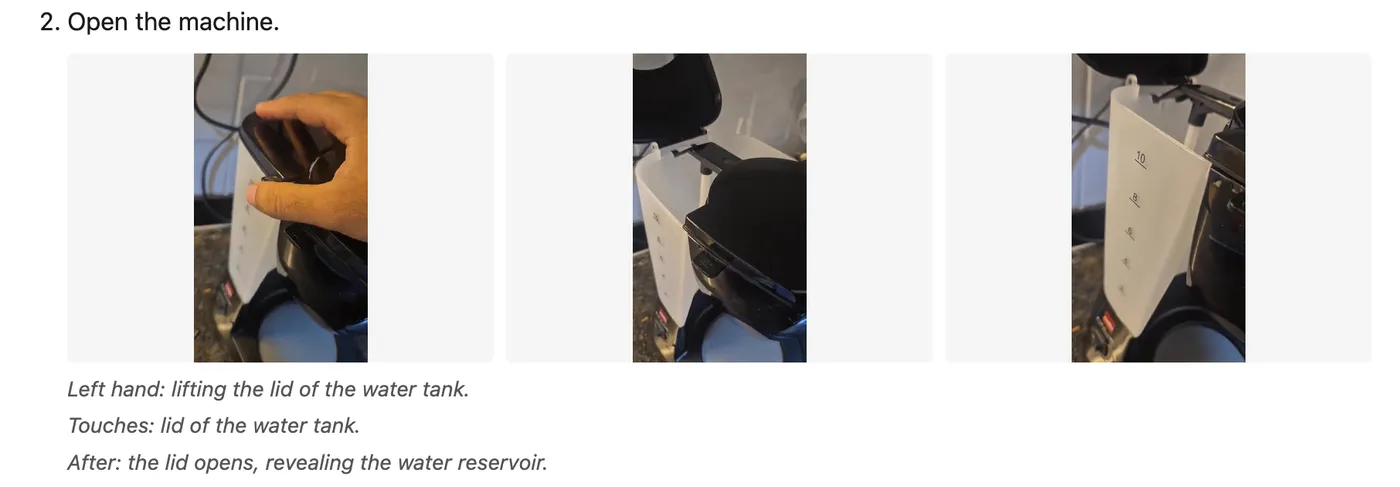 One procedure step in the rendered HTML: start/mid/end frames from the step’s clip, with the visual fields from Gemini underneath.
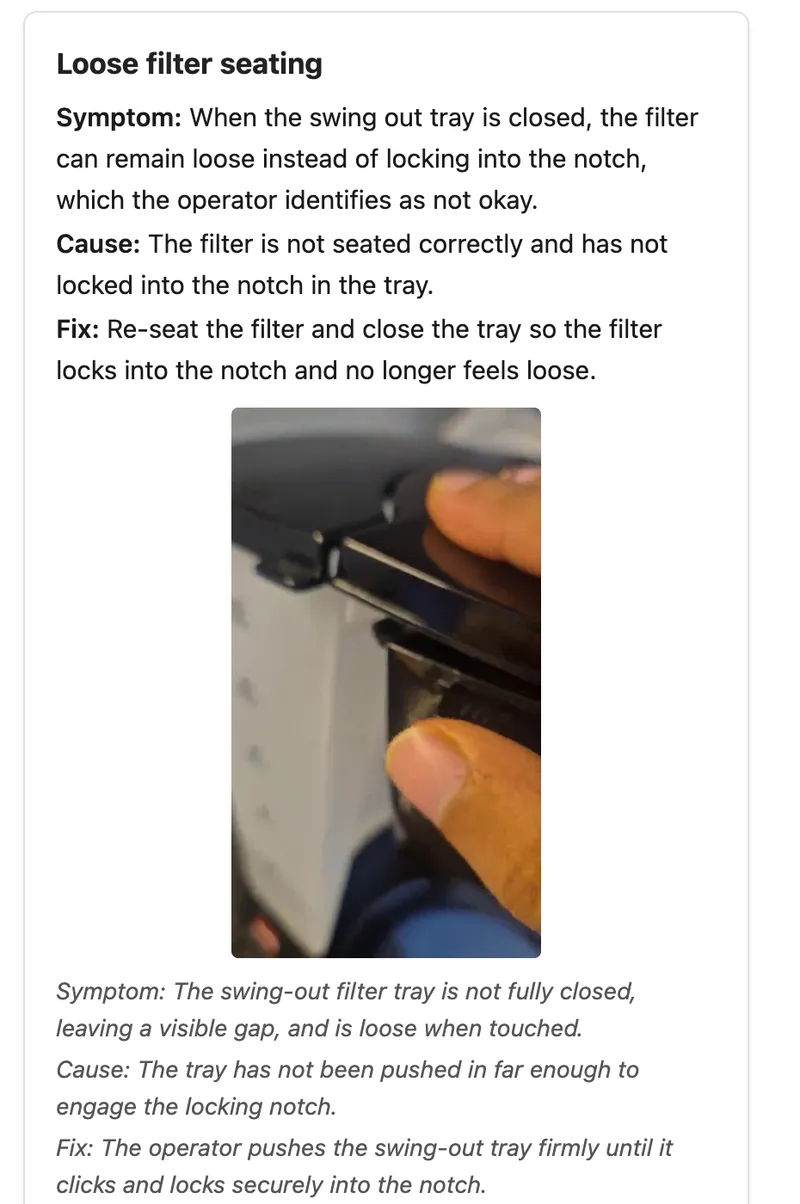 A fault in the rendered HTML: symptom → cause → fix from the narration on top, the frame and Gemini’s visual reading underneath.
So the full coffee-machine pipeline eventually looked roughly like:
13-minute video
  → SRT (whisper-1)
  → typed facts.json (specialist extraction, merge, validation)
  → Gemini around the fact timestamps
  → facts_enriched.json (+ frames)
  → deterministic Markdown / HTML
I eventually wrapped this in a Gradio UI as well, with artifact caching, progress reporting, force re-runs, Supabase storage sync, and some work to get it running on Hugging Face. I do not think those things changed the interesting part of the experiment very much.
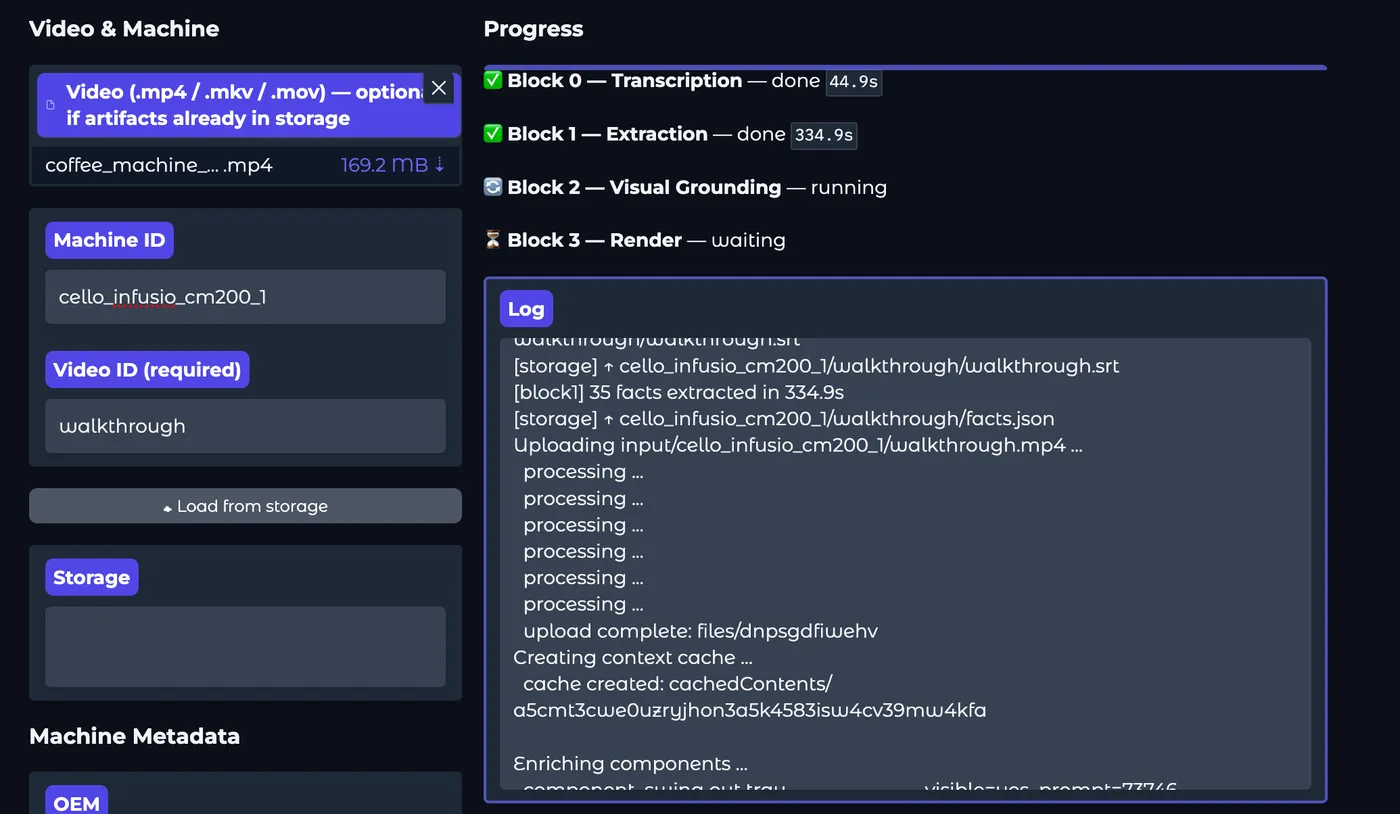 The Gradio app on Hugging Face Spaces, mid-run.
Context engineering with the information
The video-onboarding pipeline itself did not make it into Mary.
The broader problem of giving Mary machine knowledge obviously remained. Initially, some extracted/compiled information was prompt engineered directly into Mary’s context. Later we added tools through which Mary could fetch relevant knowledge when required instead of stuffing everything into the prompt.
So this was an experiment in how one source of knowledge—an expert walking through a machine—could be converted into something structured enough for an application like Mary to use.
Problems with deployment
I ended up trying this on factory machinery later than I originally expected. This exposed a problem that had basically nothing to do with model quality.
The coffee machine was easy. It was my machine, in my house; I could record whatever I wanted and upload the video to whichever API I was experimenting with. That assumption does not necessarily hold inside a factory.
For our main client, recording video of customer machinery was expressly forbidden because of the possibility of leaking design information. There are also obvious privacy/safety questions once a walkthrough can contain operators, screens, processes, and other things in the background.
So even if the extraction pipeline worked, “record a ten-minute walkthrough and upload it” was not automatically a deployable interface.
Opinion
The main thing I changed my mind about was how much of the problem was actually a video-understanding problem.
I started out interested in the idea of taking a video and having a model understand the machine from it. After doing this, I think narration is probably the spine.
If an expert says:
this is the filter
to start brewing, do x, y and z
if this happens, check this component
the reason this jams is ...
there is already a surprising amount of structured knowledge in the transcript.
The video becomes particularly useful when language starts becoming spatial:
this goes here
make sure it looks like this
don't position it like this
press this underneath that
this light should come on
Those are exactly the places where text by itself starts becoming inadequate.
One direction I still find interesting is whether the right interface is eventually less like uploading a pre-recorded walkthrough and more like a video call. If the system does not understand what an expert just showed, it could ask them to point at the component again, show the incorrect state, move the camera closer, or explain why they performed an action.
Footnotes
-
4,732 tokens with the OpenAI
o200k_basetokenizer (4,781 withcl100k_base), excluding the extraction prompt, metadata, and structured-output overhead. ↩ -
Later I read about the tendency of LLMs to “forget” information in the middle of their context window: Nelson F. Liu et al., “Lost in the Middle: How Language Models Use Long Contexts,” 2023. Context for the earlier CNC experiment, not evidence that it caused the 2/12 result. ↩
-
Historical detail: the repo declared
twelvelabs>=0.3.0, while the notes identify the tested SDK behaviour as v1.2.4. The client configuredmarengo3.0andpegasus1.2(the original spec named Pegasus 1.5, which was unavailable in the tested environment). The rank/no-score and no-time-range findings below may not hold for current Twelve Labs APIs. ↩ -
Gemini 2.5 Flash is the model named in the benchmark specification; the later integrated version made the model configurable. Explicit context caching required a billing-enabled project in the tested setup, so the code fell back to direct calls and recorded implicit-cache usage when available. See the Gemini context caching docs. ↩